

Most of our students reach for a subtractive EQ when a sound is “thin” or “dull.” But I would argue that many EQ problems are actually harmonic problems. Today, I will show you how to use saturation and distortion to “fill in” missing frequencies rather than trying to boost what isn’t there.
The Limitation of “Clean” Mixing
The instinct to reach for an EQ makes sense. If a snare lacks body, you boost 200Hz. If a vocal lacks presence, you push 4kHz. However, EQ has a strict physical limitation: it is purely a volume control for frequencies that already exist. If your bass guitar has no information in the 1800Hz range, boosting that band by 10dB won’t give you definition. It will only raise the noise floor or create a muddy, unnatural resonance.
You cannot amplify silence. This is where intermediate producers often get stuck in a loop of over-processing. They boost a frequency, realize it sounds harsh, cut it, and end up right back where they started with a thin mix.
To solve this, we have to stop trying to fix the signal and start trying to break it.
Constructive Destruction
Harmonic distortion is the tool that actually creates new frequency content. When you run a signal through a saturation plugin (whether it models tape, tubes, or transistors), you are adding harmonics. These are mathematical multiples of the fundamental frequency.
If you have a sine wave at 100Hz and you saturate it, you generate energy at 200Hz, 300Hz, 400Hz, and so on. Suddenly, that “hole” in your frequency spectrum is filled with tangible sound.
This is vital for translation. Consider the classic 808 problem. An 808 kick might be massive at 50Hz, but inaudible on a phone speaker that rolls off at 150Hz. An EQ boost at 150Hz creates a boxy, hollow sound. Saturation, however, generates upper harmonics that trick the brain into hearing the low end, even on small speakers.
The G.R.I.T. Workflow
To apply this practically, I recommend using a multiband saturator (like FabFilter Saturn, iZotope Trash, iZotope Neutron/Ozone Exciter, Wavesfactory
Spectre, etc.) or a saturator with a low-cut and high-cut filter (like Soundtoys Decapitator, Logic Pro ChromaGlow, etc.). This allows you to target the “broken” area of the spectrum without destroying the rest of the sound. Alternatively, you can also try using something like Slate Digital’s Fresh Air (which is free).
Follow the G.R.I.T. method to fix thin sources:
-
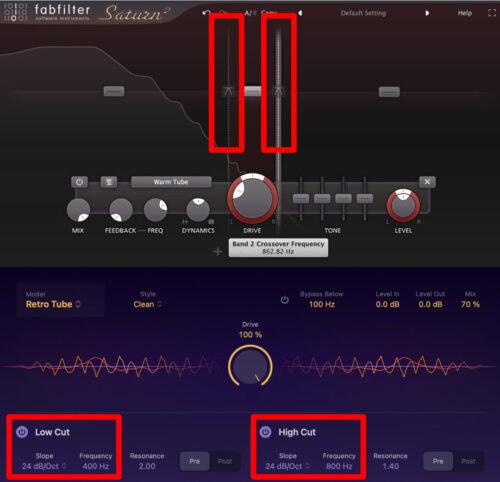
Group the Problem Frequencies: Identify exactly where the sound feels empty. Is the bass lacking “growl” (400Hz-800Hz)? Is the vocal lacking “air” (10kHz+)? Set the crossover points on your multiband saturator to isolate only that specific range. Turn of the other bands so they don’t add saturation to their frequency ranges.
-
Ramp Up the Drive: Solo that specific band and increase the drive significantly. Don’t be afraid to push it until it sounds audibly distorted or “broken.” You need to generate enough harmonic content to actually fill the frequency gap. You can back down later.


-
Inspect the Tone: Choose your distortion style carefully. If you need warmth to fill out a thin acoustic guitar, choose “Tube” or “Tape” saturation for even-order harmonics. If you need a synth to cut through a dense mix, choose “Transistor” or “Diode” for aggressive odd-order harmonics.


-
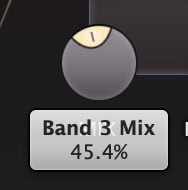
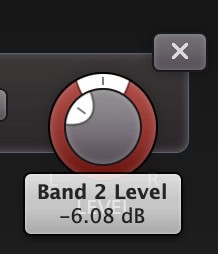
Tuck it In: This is the most important step. Un-solo the band and lower the mix (wet/dry) or output gain of that specific band. You want the texture to support the sound, not overtake it. The result should feel like a thick, natural layer rather than a distorted effect.






A New Perspective
The next time you reach for an EQ to boost a dull sound, stop and ask yourself if the frequency is hiding or if it’s missing entirely. If it’s missing, don’t fix it with an EQ curve. Break it with saturation using G.R.I.T.!
- Group the Problem Frequencies
- Ramp Up the Drive
- Inspect the Tone
- Tuck it In
G.R.I.T.!
Until next time,
Rob